
Navigation
- FAQ Home
- All categories
- Account
- Adding/Editing Content on your Website
- Billing
- Blog
- Calendar Feature
- Contact Form
- Design and Custom Graphics
- Domains
- Downloadable Files (PDF/Word Docs)
- Email Accounts
- Google Search Console
- Google/Yahoo Maps
- Hyperlinks
- Logo
- Media Library
- Music Files
- Navigation Pages
- Password Protected Pages
- Paypal
- Photos
- RSS Feeds
- Search Engine Optimization
- Side Banners
- Site Statistics
- Social Networking
- Videos (YouTube/Google Videos)
- Widgets/Affiliates and HTML
- Basic Computer Skills
- Instant Response
- Sitemap
0 Guests and 0 Registered
Records in this category
- What are side banners and why do I need them?
- How do I add an image as a side banner to one of my web pages?
- How do I add a side banner image that links to a page within my own website?
- How do I add a side banner image that links to an another website that is not my own?
- How do I add a Google Location map to my Side Banner?
- How do I add text to my side banner area?
- How do I edit an existing side banner that appears on my website?
- I would like to add a news feed of my most recent blog posts to my side banner. How do I create that?
- How do I add HTML or an Affiliate Code to my Side Banner?
- I would like to add links to my Social Media profiles in my side banner. How do I do that?
Tags
Sticky FAQs
- How do I change my password?
- How do I update my billing address?
- How do I change the contact information that appears ...
- I would like a custom design for my website. ...
- How do I change my domain name?
- I purchased my domain through my own registrant service ...
- I have just gotten a brand new email account ...
- I forgot my password to my email account. How ...
- How do I add a Map to a page ...
- How do I add a link to another website ...
- How do I upload my logo to my website? ...
- How do I add a new Navigation page to ...
- How do I change the order of my Web ...
- How do I add Photos to my Web page? ...
- What are Search Engine Meta Titles, Keywords and Descriptions ...
- How do I add text to a web page? ...
- How do I setup my new email address to ...
- How do I receive email from my website to ...
- How do I update my credit card (or ACH ...
- How do I get an email account for my ...
- How do I get First Page Placement in the ...
- The Calendar feature has been added to my website. ...
- I have forgotten my password to log into my ...
- How do I change my username for logging into ...
- What are the benefits and features of the Password ...
- How do I upload multiple photos at a time ...
Side Banners
How do I add a side banner image that links toan another websitethat is not my own?
1. From your Web Builder Dashboard, select Manage Side Banners from the WebsiteContent section. You can also reach this from Edit WebsiteMode by clicking the Side Banner Library link on your Main Menu bar
2. Select Image (with Link)
3. Browse tolocate the image file from your computer you want touse or choose from your image library
4. Upload the image
5. Under Option 2 Outside Link type or paste the full URL in which you want the image tolink (i.e. http://www.externalsite.com)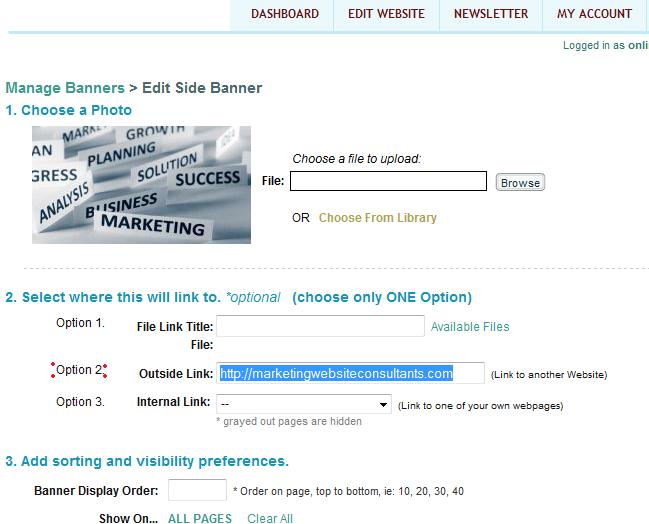
6. Choose a sort number that you would like that banner toappear under. *1 is highest in side banner, 100+ is lowest
7. Select the pages you want the side banner toappear on or choose Show On All Pages
8. Submit your side banner and publish your pages
Tags: Side Banners
Related entries:
- How do I add a contact form to multiple pages within my website, not just on my contact us page?
- I have multiple Web Sites in my Web Builder Account. Can I move Web Page content from one site to another?
- Do you automatically upgrade my account when I’ve used all of my disk space?
- I have more than one Web Site in my account. When I’m logged in, how do I switch to another site?
- How do I update my billing address?
Last update: 2011-07-19 21:40
Author: WebBuilder Support
Revision: 1.5


