
Navigation
- FAQ Home
- All categories
- Account
- Adding/Editing Content on your Website
- Billing
- Blog
- Calendar Feature
- Contact Form
- Design and Custom Graphics
- Domains
- Downloadable Files (PDF/Word Docs)
- Email Accounts
- Google Search Console
- Google/Yahoo Maps
- Hyperlinks
- Logo
- Media Library
- Music Files
- Navigation Pages
- Password Protected Pages
- Paypal
- Photos
- RSS Feeds
- Search Engine Optimization
- Side Banners
- Site Statistics
- Social Networking
- Videos (YouTube/Google Videos)
- Widgets/Affiliates and HTML
- Basic Computer Skills
- Instant Response
- Sitemap
0 Guests and 0 Registered
Records in this category
- I have multiple Web Sites in my Web Builder Account. Can I move Web Page content from one site to another?
- How do I add text to a web page?
- How do I change the color of my text?
- How do I move content from one page to another page of my website?
- How do I move content on the same page of my website?
- How to make use of "anchors" in my website:
- How do I add text to, or edit text in, the footer of my website?
- How do I edit text on my website?
- How Do I Activate the Google Translator Feature?
- How do I add and edit h-tags (headings) to my webpages?
Tags
Sticky FAQs
- How do I change my password?
- How do I update my billing address?
- How do I change the contact information that appears ...
- I would like a custom design for my website. ...
- How do I change my domain name?
- I purchased my domain through my own registrant service ...
- I have just gotten a brand new email account ...
- I forgot my password to my email account. How ...
- How do I add a Map to a page ...
- How do I add a link to another website ...
- How do I upload my logo to my website? ...
- How do I add a new Navigation page to ...
- How do I change the order of my Web ...
- How do I add Photos to my Web page? ...
- What are Search Engine Meta Titles, Keywords and Descriptions ...
- How do I add text to a web page? ...
- How do I setup my new email address to ...
- How do I receive email from my website to ...
- How do I update my credit card (or ACH ...
- How do I get an email account for my ...
- How do I get First Page Placement in the ...
- The Calendar feature has been added to my website. ...
- I have forgotten my password to log into my ...
- How do I change my username for logging into ...
- What are the benefits and features of the Password ...
- How do I upload multiple photos at a time ...
Adding/Editing Content on your Website
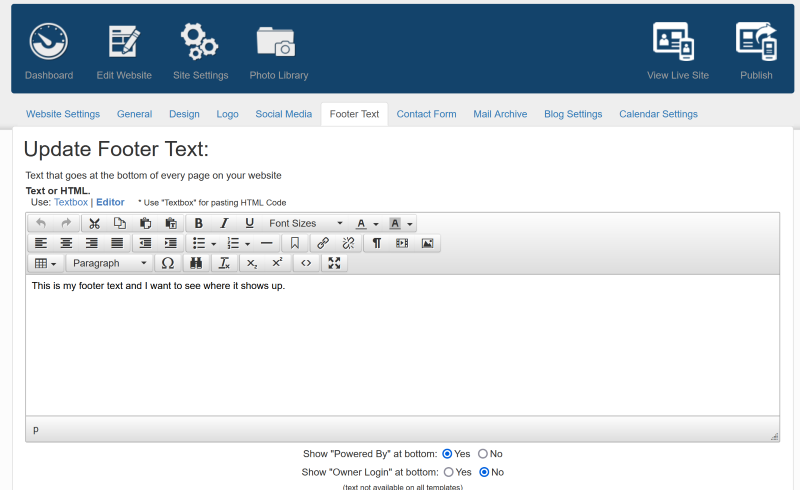
How do I add text to, or edit text in, the footer of my website?
1. From your Dashboard, click on "Site Settings" on the left side of the dark blue box at the top of the page.
2. Click the "Footer Text" Tab
3. Type or edit you text in the text editing field (box).
4. To save your changes, click the green "Submit" button at the bottom of the page.
5. To make your changes live, click "Publish" on the right side of the dark blue box near the top of the screen.
6. Click the gray "Publish All Pages" button on the left side of your screen.
7. To see changes on your live site, you may need to refresh your browser (click the circular arrow on the right or left side of the address bar in your browser).
Tags: Adding/Editing Content on your Website
Related entries:
- How do I add a contact form to multiple pages within my website, not just on my contact us page?
- I have multiple Web Sites in my Web Builder Account. Can I move Web Page content from one site to another?
- I have more than one Web Site in my account. When I’m logged in, how do I switch to another site?
- How do I update my billing address?
- I would like to add my own Favicon to my site. How do I do that?
Last update: 2026-05-12 13:47
Author: WebBuilder Support
Revision: 1.5


